

Google Scholar Access Issue
Having trouble accessing Google Scholar through Bar-Ilan University's subscription?
To resolve the issue, please visit the Google Scholar website directly (without using the university subscription) and update the library links in your browser settings.
A full explanation is available in the video (in Hebrew).
Additional Instructions for Updating Library Links in Google Scholar
- Enter Google Scholar.
- Click on the three horizontal lines at the top of the screen.
- In the menu select Settings.
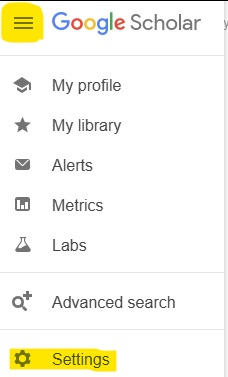
- In the new menu, click on Library links.
- In the search box type Bar Ilan and click Search.
- Select the option Full Text@BIU and save your settings.
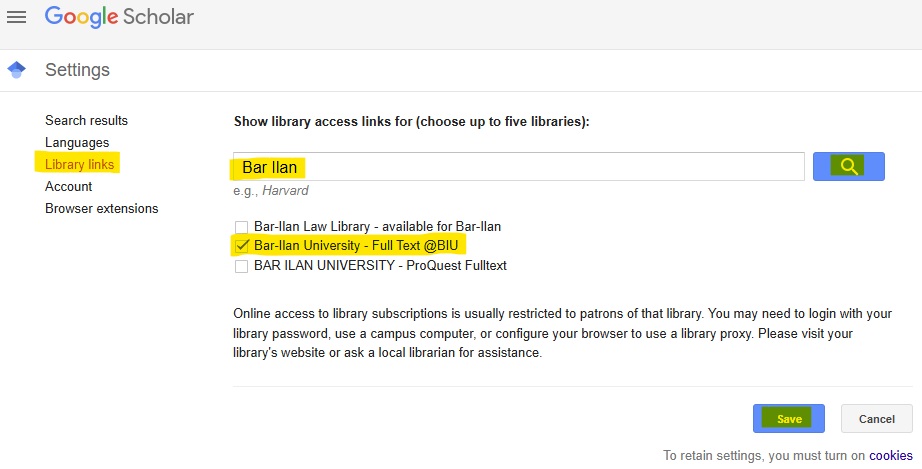
Once this is done, Google Scholar will correctly link to the library’s resources and provide access to full-text articles.
For any questions, please contact the library staff.
Or reach out to the Reference unit:
Phone: 03-5317955
Email: Lib.Ref@biu.ac.il
Last Updated Date : 12/08/2026